概述
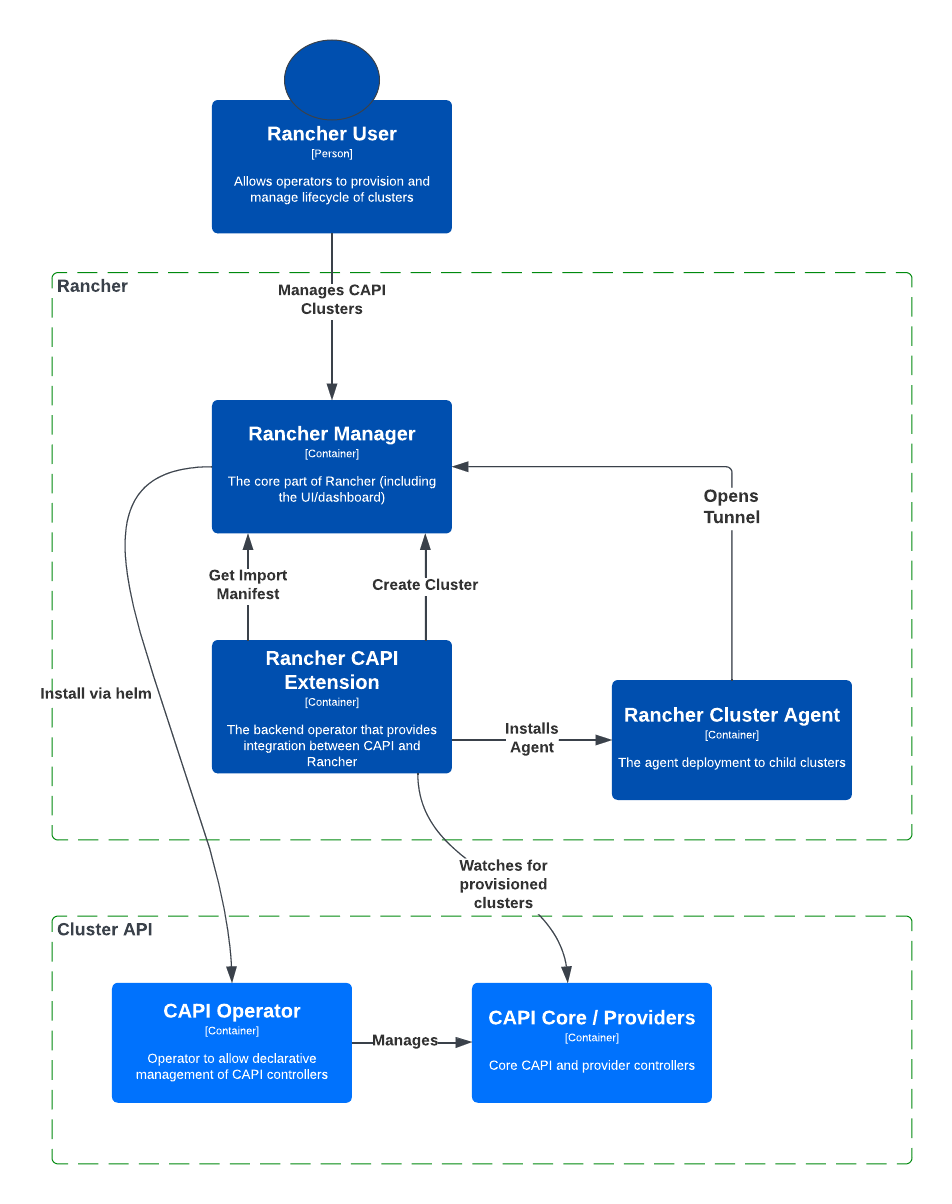
架構圖
以下是 Rancher Turtles 的關鍵元件以及它們與 Rancher 和 Rancher Cluster Agent 之間關係的視覺化表示。了解這些元件對於深入了解 Rancher 如何利用 CAPI operator 進行叢集管理至關重要。
安全性
根據 Supply-chain Levels for Software Artifacts (SLSA) 的定義,SLSA 是一組由業界共識建立的供應鏈安全遞增式採用指南。SLSA 制定的規範對軟體生產者和消費者都很有用:生產者可以遵循 SLSA 的指南使其軟體供應鏈更加安全,消費者可以使用 SLSA 來決定是否信任軟體套件。
Rancher Turtles 符合 SLSA Level 3 要求,作為適當的強化建置平台,具有一致的建置流程和來源分發。有關更多資訊,請造訪 Rancher Turtles Security 文件。
先決條件
在 Rancher 環境中安裝 Rancher Turtles 之前,您必須停用 Rancher 的 embedded-cluster-api 功能。這還包括清理 Rancher 特定的 webhooks,否則會與 CAPI 的 webhooks 衝突。
為了簡化為安裝 Rancher Turtles 而設定 Rancher,官方 Rancher Turtles Helm chart 包含一個 pre-install hook,它會移除以下內容:
- 在 Rancher 中停用
embedded-cluster-api功能。 - 刪除
mutating-webhook-configuration和validating-webhook-configurationwebhooks,因為它們不再需要。
這些 webhooks 也可以透過 Rancher UI 移除:
- 在左上角,點擊 ☰ > Cluster Management。
- 選擇您的本機叢集。
- 在左側導航選單中,選擇 More Resources > Admission。
- 從下拉選單中,選擇
MutatingWebhookConfiguration和ValidatingWebhookConfiguration的資源頁面。 - 在相應的資源頁面上,點擊附加到
mutating-webhook-configuration和validating-webhook-configurationwebhooks 的 ⋮,然後選擇 Delete 選項。
也可以透過在 Resource Search 欄位中輸入 webhooks 的名稱來存取 webhooks。
以下 kubectl 命令可以手動移除必要的 webhooks:
kubectl delete mutatingwebhookconfiguration.admissionregistration.k8s.io mutating-webhook-configuration
kubectl delete validatingwebhookconfigurations.admissionregistration.k8s.io validating-webhook-configuration
使用以下範例從控制台停用 embedded-cluster-api 功能:
- 建立一個
feature.yaml檔案,將embedded-cluster-api設定為 false:
apiVersion: management.cattle.io/v3
kind: Feature
metadata:
  name: embedded-cluster-api
spec:
  value: false
- 使用
kubectl將feature.yaml檔案應用到叢集:
kubectl apply -f feature.yaml
安裝 Rancher Turtles Operator
您可以透過 Rancher UI 或使用 Helm 安裝 Rancher Turtles operator。建議大多數環境使用第一種方法。
如果您的叢集中已經安裝了 Cluster API (CAPI) Operator,您必須使用手動 Helm 安裝方法。
透過 Rancher UI 安裝
透過 Rancher UI 新增 Turtles 儲存庫,Rancher 可以處理 CAPI Extension 的安裝和配置。
- 點擊 ☰。在左側導航選單的 Explore Cluster 下,選擇 local。
- 在 Cluster Dashboard 的左側導航選單中,選擇 Apps > Repositories。
- 點擊 Create 以新增新的儲存庫。
- 輸入以下內容:
- Name: turtles
- Index URL: https://rancher.github.io/turtles
- 等待新儲存庫的狀態為
Active。 - 在左側導航選單中,選擇 Apps > Charts。
- 在搜尋篩選器中輸入 "turtles" 以找到 Turtles chart。
- 點擊 Rancher Turtles - the Cluster API Extension。
- 點擊 Install > Next > Install。
此流程使用 Helm chart 的預設值,這些值適用於大多數安裝。如果您的配置需要覆蓋某些預設值,您可以在從 Rancher UI 安裝期間指定值,或者您可以透過 Helm 手動安裝 chart。有關可用值的詳細資訊,請參閱 Rancher Turtles Helm chart 參考指南。
安裝可能需要幾分鐘,完成後您可以在叢集中看到以下新部署:
rancher-turtles-system/rancher-turtles-controller-managerrancher-turtles-system/rancher-turtles-cluster-api-operatorcapi-system/capi-controller-manager
示範
此示範說明如何使用 Rancher UI 安裝 Rancher Turtles、建立/匯入 CAPI 叢集,以及在叢集上安裝監控:
透過 Helm 安裝
有兩種使用 Helm 安裝 Rancher Turtles 的方法,取決於您是否將 CAPI Operator 作為依賴項包含:
安裝 Rancher Turtles 需要 CAPI Operator。您可以選擇是否要自己處理此依賴項,或讓 Rancher Turtles Helm chart 為您管理它。將 Turtles 作為依賴項安裝更簡單,但最佳選擇取決於您的特定配置。
CAPI Operator 允許使用聲明式方法處理 CAPI providers 的生命週期,擴展了 clusterctl 的功能。如果您想了解更多資訊,可以參考 Cluster API Operator book。
將 Rancher Turtles 與 Cluster API (CAPI) Operator 作為 Helm 依賴項一起安裝
- 將包含
rancher-turtleschart 的 Helm 儲存庫新增為安裝的第一步:
helm repo add turtles https://rancher.github.io/turtles
helm repo update
- 如前所述,安裝 Rancher Turtles 需要 CAPI Operator。Helm chart 可以使用最少的標誌自動安裝它:
helm install rancher-turtles turtles/rancher-turtles --version <version> \
    -n rancher-turtles-system \
    --dependency-update \
    --create-namespace --wait \
    --timeout 180s
- 此操作可能需要幾分鐘,完成後您可以查看下面列出的已安裝 controllers:
rancher-turtles-controllercapi-operator
- 如果
cert-manager已在叢集中可用,請停用它作為 Rancher Turtles 依賴項的安裝。這可以防止依賴項衝突:--set cluster-api-operator.cert-manager.enabled=false - 有關 Rancher Turtles 版本列表,請參閱 Turtles release page。
這是基本的、推薦的配置,它管理在核心提供商命名空間中建立包含所需 CAPI 功能標誌(CLUSTER_TOPOLOGY、EXP_CLUSTER_RESOURCE_SET 和 EXP_MACHINE_POOL 已啟用)的 secret。這些功能標誌是啟用額外 CAPI 功能所必需的。
如果您需要覆蓋預設行為並使用現有的 secret(或新增自訂環境變數),您可以傳遞 secret 名稱 Helm 標誌。在這種情況下,作為使用者,您負責管理 secret 的建立及其內容,包括啟用最低要求的功能:CLUSTER_TOPOLOGY、EXP_CLUSTER_RESOURCE_SET 和 EXP_MACHINE_POOL。
helm install ...
    # 傳遞 secret 名稱和命名空間以獲取額外的環境變數
    --set cluster-api-operator.cluster-api.configSecret.name=<secret-name>
以下是使用者管理的 secret cluster-api-operator.cluster-api.configSecret.name=variables 的範例,其中設定了 CLUSTER_TOPOLOGY、EXP_CLUSTER_RESOURCE_SET 和 EXP_MACHINE_POOL 功能標誌以及一個額外的自訂變數:
apiVersion: v1
kind: Secret
metadata:
  name: variables
  namespace: rancher-turtles-system
type: Opaque
stringData:
  CLUSTER_TOPOLOGY: "true"
  EXP_CLUSTER_RESOURCE_SET: "true"
  EXP_MACHINE_POOL: "true"
  CUSTOM_ENV_VAR: "false"
有關 chart 支援的值及其使用的詳細資訊,請參閱 Helm chart options。
在沒有 Cluster API (CAPI) Operator 作為 Helm 依賴項的情況下安裝 Rancher Turtles
請記住,如果您選擇此安裝選項,您必須自己管理 CAPI Operator 安裝。您可以按照 Rancher Turtles 文件中的手動安裝指南獲取協助。
- 將包含
rancher-turtleschart 的 Helm 儲存庫新增為安裝的第一步:
helm repo add turtles https://rancher.github.io/turtles
helm repo update
- 將 chart 安裝到
rancher-turtles-system命名空間:
helm install rancher-turtles turtles/rancher-turtles --version <version>
    -n rancher-turtles-system
    --set cluster-api-operator.enabled=false
    --set cluster-api-operator.cluster-api.enabled=false
    --create-namespace --wait
    --dependency-update
前面的命令告訴 Helm 忽略安裝 cluster-api-operator 作為依賴項。
- 此操作可能需要幾分鐘,完成後您可以查看下面列出的已安裝 controller:
rancher-turtles-controller
解除安裝 Rancher Turtles
在 Rancher 環境中安裝 Rancher Turtles 時,預設情況下,Rancher Turtles 啟用 CAPI Operator 清理。這包括清理 CAPI Operator 特定的 webhooks 和部署,否則會導致 Rancher 佈建出現問題。
為了簡化解除安裝 Rancher Turtles(透過 Rancher 或 Helm 命令),官方 Rancher Turtles Helm chart 包含一個 post-delete hook,它會移除以下內容:
- 刪除不再需要的
mutating-webhook-configuration和validating-webhook-configurationwebhooks。 - 刪除不再需要的 CAPI
deployments。
要解除安裝 Rancher Turtles:
helm uninstall -n rancher-turtles-system rancher-turtles --cascade foreground --wait
這可能需要幾分鐘才能完成。
請記住,如果您為安裝使用不同的名稱或不同的命名空間,您可能需要為您的特定配置自訂命令。
解除安裝 Rancher Turtles 後,必須重新啟用 Rancher 的 embedded-cluster-api 功能:
- 建立一個
feature.yaml檔案,將embedded-cluster-api設定為 true:
apiVersion: management.cattle.io/v3
kind: Feature
metadata:
  name: embedded-cluster-api
spec:
  value: true
- 使用
kubectl將feature.yaml檔案應用到叢集:
kubectl apply -f feature.yaml