概覽
NeuVector 5.x 是一個與 Rancher 整合的開源容器中心安全平台。NeuVector 在執行時為關鍵應用程式和資料提供即時合規性、可見性和保護。NeuVector 提供防火牆、容器程序/檔案系統監控、使用 CIS 基準的安全稽核和漏洞掃描。有關 Rancher 安全性的更多資訊,請參閱安全文件。
NeuVector 可以透過 Helm chart 啟用,該 chart 可以透過 Rancher UI 中的 Apps 或 Cluster Tools 按鈕安裝。安裝 Helm chart 後,使用者可以輕鬆在 Rancher 中部署和管理 NeuVector 叢集。
使用 Rancher 安裝 NeuVector
Harvester Helm Chart 用於管理 Rancher 中對 NeuVector UI 的存取,使用者可以在其中直接導航以部署和管理其 NeuVector 叢集。
透過 Apps 導航並安裝 NeuVector chart:
- 點擊 ☰ > Cluster Management。
- 在 Clusters 頁面上,前往你想要部署 NeuVector 的叢集,然後點擊 Explore。
- 前往 Apps > Charts,並從 chart repo 安裝 NeuVector。
- 不同的叢集類型需要不同的容器執行時。在配置 Helm chart 值時,前往 Container Runtime 部分,並根據叢集類型選擇你的執行時。最後,再次點擊 Install。
一些範例如下:
-
K3s 和 RKE2:
k3scontainerd -
AKS:v1.19 及以上版本使用
containerd -
EKS:v1.22 及以下版本使用
docker;v1.23 及以上版本使用containerd -
GKE:
containerd(有關更多資訊,請參閱 Google 文件)備註安裝期間一次只能選擇一個容器執行時引擎。
透過 Cluster Tools 導航並安裝 NeuVector chart:
- 點擊 ☰ > Cluster Management。
- 在 Clusters 頁面上,前往你想要部署 NeuVector 的叢集,然後點擊 Explore。
- 點擊左側導航列底部的 Cluster Tools。
- 重複上面的步驟 4,相應地選擇你的容器執行時,然後再次點擊 Install。
從 Rancher UI 存取 NeuVector
- 導航到安裝 NeuVector 的叢集的叢集資源管理器。在左側導航列中,點擊 NeuVector。
- 點擊外部連結前往 NeuVector UI。選擇連結後,使用者必須接受
END USER LICENSE AGREEMENT才能存取 NeuVector UI。
從 Rancher UI 解除安裝 NeuVector
從 Apps 解除安裝:
- 點擊 ☰ > Cluster Management。
- 在 Apps 下,點擊 Installed Apps。
- 在
cattle-neuvector-system下,選擇 NeuVector 應用程式(如果需要,還有相關的 CRD),然後點擊 Delete。
從 Cluster Tools 解除安裝:
- 點擊 ☰ > Cluster Management。
- 點擊螢幕左下方的 Cluster Tools,然後點擊 NeuVector chart 下的垃圾桶圖示。如果需要,選擇
Delete the CRD associated with this app,然後點擊 Delete。
GitHub 儲存庫
NeuVector 專案可在此處取得。
文件
NeuVector 文件位於此處。
架構
NeuVector 安全解決方案包含四種類型的安全容器:Controllers、Enforcers、Managers 和 Scanners。還提供了一個稱為 All-in-One 的特殊容器,將 Controller、Enforcer 和 Manager 功能組合在一個容器中,主要用於 Docker 原生部署。還有一個 Updater,執行時會更新 CVE 資料庫。
- Controller: 管理 NeuVector Enforcer 容器;為管理控制台提供 REST API。
- Enforcer: 強制執行安全策略。
- Manager: 提供 web-UI 和 CLI 控制台來管理 NeuVector 平台。
- All-in-One: 包括 Controller、Enforcer 和 Manager。
- Scanner: 對映像、容器和節點執行漏洞和合規性掃描。
- Updater: 為 Neuvector 更新 CVE 資料庫(執行時);重新部署 scanner pods。
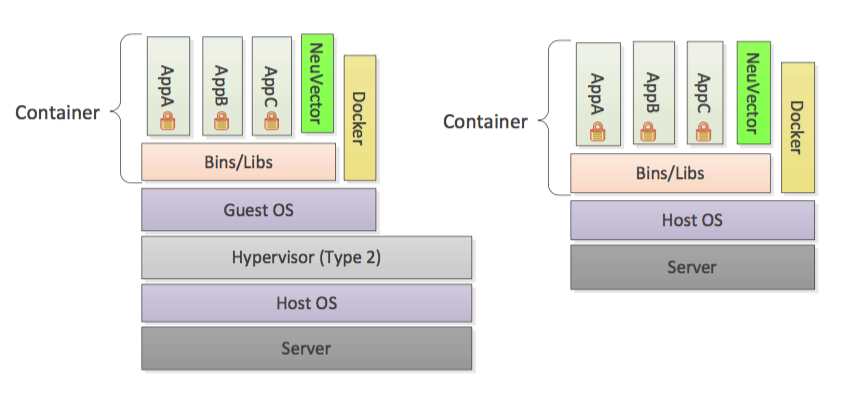
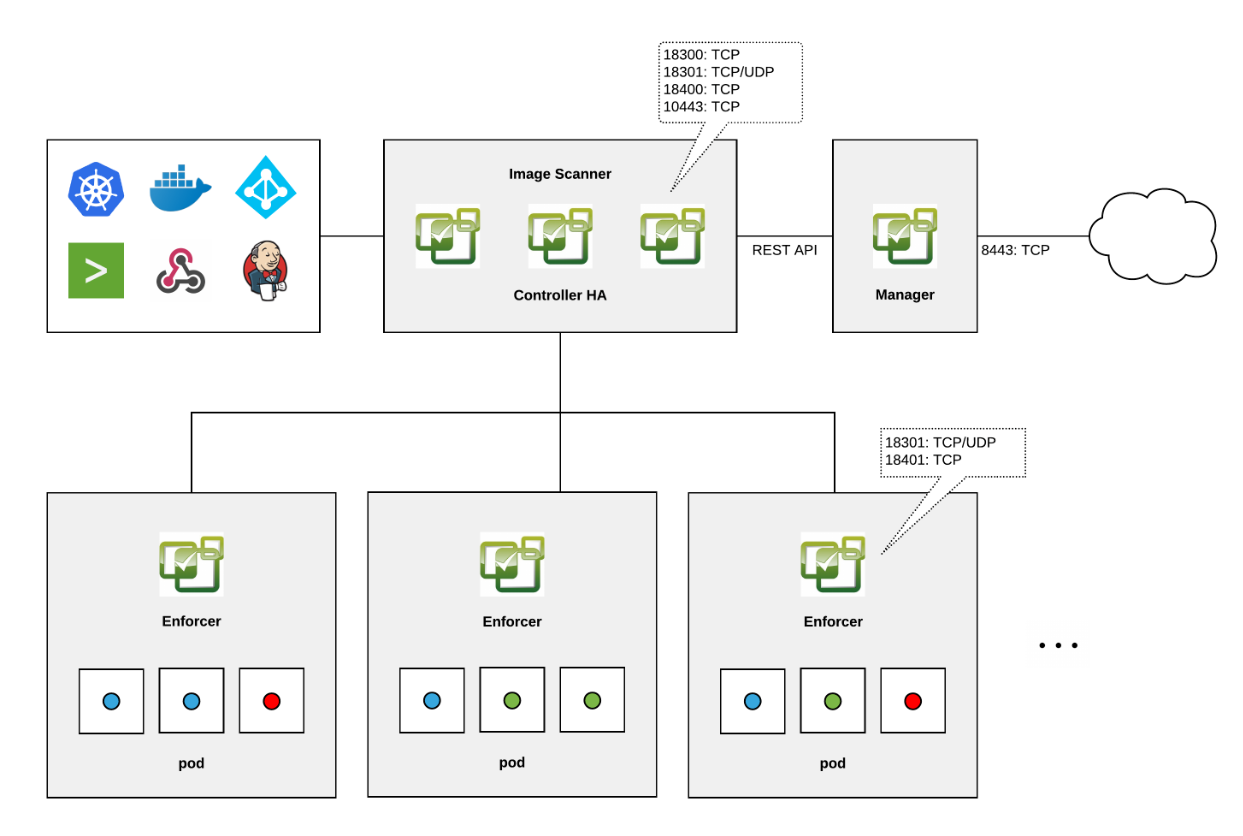
要了解有關 NeuVector 架構的更多資訊,請參閱此處。
CPU 和記憶體配置
以下是預設部署中 NeuVector chart 安裝的最低建議運算資源。請注意,未設定資源限制。
| 容器 | CPU - 請求 | 記憶體 - 請求 |
|---|---|---|
| Controller | 3 (每個 controller 需要 1GB 1vCPU) | * |
| Enforcer | 在所有節點上 (500MB .5vCPU) | 1GB |
| Manager | 1 (500MB .5vCPU) | * |
| Scanner | 3 (100MB .5vCPU) | * |
* Controller、Manager 和 Scanner 容器合計至少需要 1GB 記憶體。
硬化叢集支援 - Calico 和 Canal
如果 PSP 設定為 true,則可以部署 NeuVector 元件 Controller 和 Enforcer。
僅適用於 NeuVector chart 版本 100.0.0+up2.2.0:
對於 Manager、Scanner 和 Updater 元件,需要額外的配置,如下所示:
kubectl patch deploy neuvector-manager-pod -n cattle-neuvector-system --patch '{"spec":{"template":{"spec":{"securityContext":{"runAsUser": 5400}}}}}'
kubectl patch deploy neuvector-scanner-pod -n cattle-neuvector-system --patch '{"spec":{"template":{"spec":{"securityContext":{"runAsUser": 5400}}}}}'
kubectl patch cronjob neuvector-updater-pod -n cattle-neuvector-system --patch '{"spec":{"jobTemplate":{"spec":{"template":{"spec":{"securityContext":{"runAsUser": 5400}}}}}}}'
你需要為你的硬化叢集環境設定額外的配置。
你必須在 RKE2 和 K3s 硬化叢集中更新你的配置,如下所示。
- 點擊 ☰ > Cluster Management。
- 前往你建立的叢集,然後點擊 Explore。
- 在左側導航列中,點擊 Apps。
- 安裝(或升級到)NeuVector 版本
100.0.1+up2.2.2。
-
在 Edit Options > Other Configuration 下,透過勾選核取方塊啟用 Pod Security Policy。請注意,你還必須為
Manager runAsUser ID、Scanner runAsUser ID和Updater runAsUser ID輸入大於zero的值: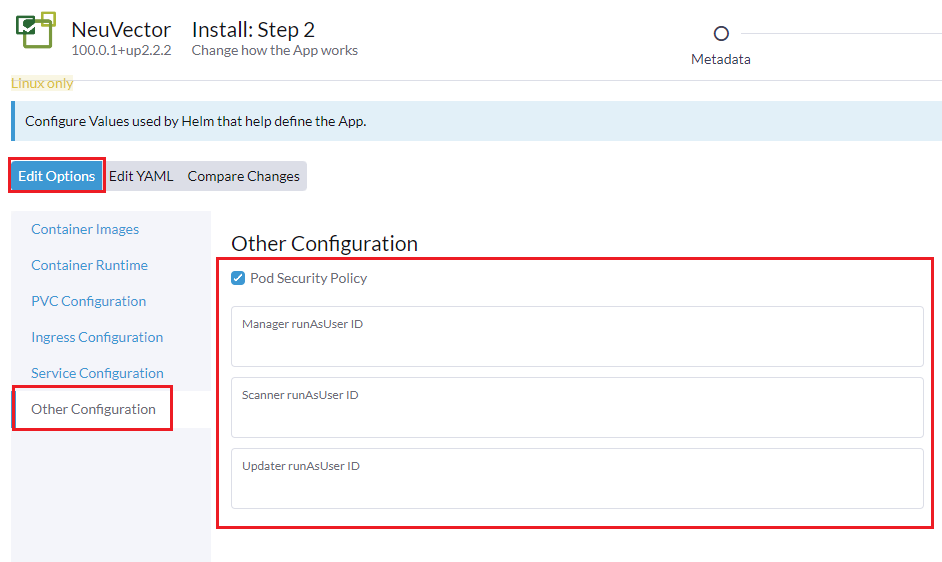
- 點擊右下角的 Install 以完成。
啟用 SELinux 的叢集支援 - Calico 和 Canal
要在 RKE2 叢集上啟用 SELinux,請按照以下步驟操作:
- 如果 PSP 設定為 true,則可以部署 NeuVector 元件 Controller 和 Enforcer。
僅適用於 NeuVector chart 版本 100.0.0+up2.2.0:
- 對於 Manager、Scanner 和 Updater 元件,需要額外的配置,如下所示:
kubectl patch deploy neuvector-manager-pod -n cattle-neuvector-system --patch '{"spec":{"template":{"spec":{"securityContext":{"runAsUser": 5400}}}}}'
kubectl patch deploy neuvector-scanner-pod -n cattle-neuvector-system --patch '{"spec":{"template":{"spec":{"securityContext":{"runAsUser": 5400}}}}}'
kubectl patch cronjob neuvector-updater-pod -n cattle-neuvector-system --patch '{"spec":{"jobTemplate":{"spec":{"template":{"spec":{"securityContext":{"runAsUser": 5400}}}}}}}'
離線環境中的叢集支援
- 所有 NeuVector 元件都可以在離線環境中的叢集上部署,無需任何額外配置。
支援限制
-
目前僅支援管理員和叢集擁有者。
-
不支援 Fleet 多叢集部署。
-
Windows 叢集不支援 NeuVector。
其他限制
-
目前,當 NeuVector 合作夥伴 chart 已存在時,NeuVector 功能 chart 安裝會失敗。要解決此問題,請解除安裝 NeuVector 合作夥伴 chart 並重新安裝 NeuVector 功能 chart。
-
有時當 controllers 未就緒時,無法從 Rancher UI 存取 NeuVector UI。在此期間,controllers 將嘗試重新啟動,controllers 啟用需要幾分鐘時間。
-
安裝 NeuVector chart 時,不會自動檢測不同叢集類型的容器執行時。要解決此問題,你可以手動指定執行時。