StorageClass
Harvester 使用 StorageClass 來描述 Longhorn 必須如何供應 (provision) 卷冊 (volumes)。Longhorn StorageClass 可以對應到由叢集管理員建立的複本策略 (replica policies)、節點排程策略或磁碟排程策略。這個概念在其他儲存系統中被稱為 設定檔 (profiles)。
預設的 StorageClass harvester-longhorn 擁有 3 個複本計數以實現高可用性。如果您在單節點叢集中使用 harvester-longhorn,Longhorn 將無法建立預設數量的複本,並且卷冊會在 Harvester UI 的 Volumes 畫面上被標記為 Degraded (降級)。
若要避免此問題,您可以執行以下任一動作:
-
使用 Harvester 設定 檔案將
harvester-longhorn的 複本數量 變更為1。 -
建立一個新的 StorageClass,並將 Number of Replicas 參數設定為
1。建立後,在清單中找到新的 StorageClass,然後選取 ⋮ > Set as Default (設為預設)。
關於使用外部容器儲存介面 (CSI) 驅動程式進行卷冊供應的支援資訊,請參閱 第三方儲存支援。
建立 StorageClass
- UI
- API
- Terraform
建立 StorageClass 後,Parameters (參數) 區段中的欄位與大多數其他選項將變為不可變 (immutable)。
-
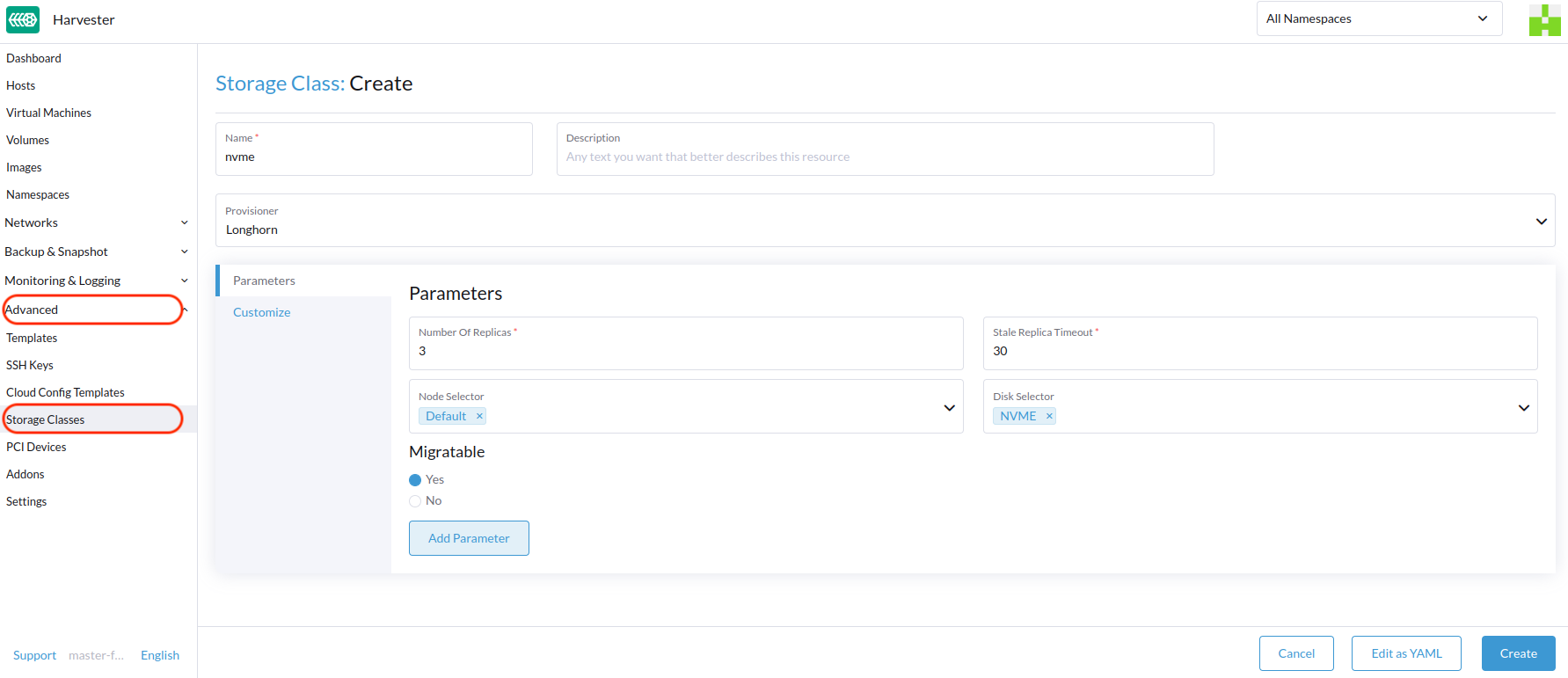
在 Harvester UI 上,前往 Advanced > StorageClasses。
-
在一般資訊區段中,設定以下內容:
- Name: StorageClass 的名稱。
- Description (選用): StorageClass 的描述。
- Provisioner: 決定用於供應卷冊之卷冊外掛程式的供應程式。
-
在 Parameters (參數) 頁籤上,設定以下內容:
- Number of Replicas: 為每個 Longhorn 卷冊建立的複本數量。預設值為
3。 - Stale Replica Timeout: Longhorn 在清理狀態為
ERROR的複本之前等待的分鐘數。預設值為30。 - Node Selector (選用): 卷冊排程期間要比對的節點標籤 (node tags)。您可以在主機設定畫面 (Host -> Edit Config) 新增節點標籤。
- Disk Selector (選用): 卷冊排程期間要比對的磁碟標籤 (disk tags)。您可以在主機設定畫面 (Host -> Edit Config) 新增磁碟標籤。
- Migratable: 為使用此 StorageClass 建立的卷冊啟用 線上移轉 (Live Migration) 的設定。預設值為
Yes。
警告如果使用複本計數為
1的 StorageClass 建立卷冊並將其掛接至虛擬機器,該虛擬機器將被視為 不可移轉 (non-migratable)。 - Number of Replicas: 為每個 Longhorn 卷冊建立的複本數量。預設值為
-
在 Customize (自訂) 頁籤上,設定以下內容:
-
Reclaim Policy: 套用於使用此 StorageClass 建立之卷冊的回收策略。預設值為
Delete。Delete: 當卷冊宣告 (volume claim) 被刪除時,刪除卷冊和底層裝置。Retain: 保留卷冊以供手動清理。
-
Allow Volume Expansion: 允許卷冊擴充的設定,這涉及區塊裝置的調整大小和檔案系統的擴充。啟用此設定後,您可以透過編輯相應的 PVC 物件來增加卷冊大小。預設值為
Enabled。備註您只能使用卷冊擴充功能來增加卷冊大小。
-
Volume Binding Mode: 控制何時進行卷冊綁定和動態供應的設定。預設值為
Immediate。- Immediate: 一旦建立 PVC,立即綁定並供應卷冊。
- WaitForFirstConsumer: 一旦建立使用該 PVC 的虛擬機器,才綁定並供應卷冊。
-
-
點擊 Create (建立)。
apiVersion: storage.k8s.io/v1
kind: StorageClass
metadata:
  annotations:
    storageclass.beta.kubernetes.io/is-default-class: 'true'
    storageclass.kubernetes.io/is-default-class: 'true'
  name: single-replica
parameters:
  migratable: 'false'
  numberOfReplicas: '1'
  staleReplicaTimeout: '30'
provisioner: driver.longhorn.io
reclaimPolicy: Delete
volumeBindingMode: Immediate
allowVolumeExpansion: true
resource "harvester_storageclass" "single-replica" {
  name = "single-replica"

  is_default = "true"
  allow_volume_expansion = "true"
  volume_binding_mode = "immediate"
  reclaim_policy = "delete"

  parameters = {
    "migratable"          = "false"
    "numberOfReplicas"    = "1"
    "staleReplicaTimeout" = "30"
  }
}
資料在地性設定 (Data Locality Settings)
當 Longhorn 卷冊的至少一個複本必須(儘可能地)排程在與使用該卷冊的 Pod 相同的節點上時,您可以使用 dataLocality 參數。
Harvester 自 v1.3.0 起正式支援資料在地性 (data locality)。這甚至適用於從 映像檔 建立的卷冊。若要設定資料在地性,請在 Harvester UI 上建立一個新的 StorageClass (Storage Classess > Create > Parameters),然後新增以下參數:
- Key:
dataLocality - Value:
disabled或best-effort
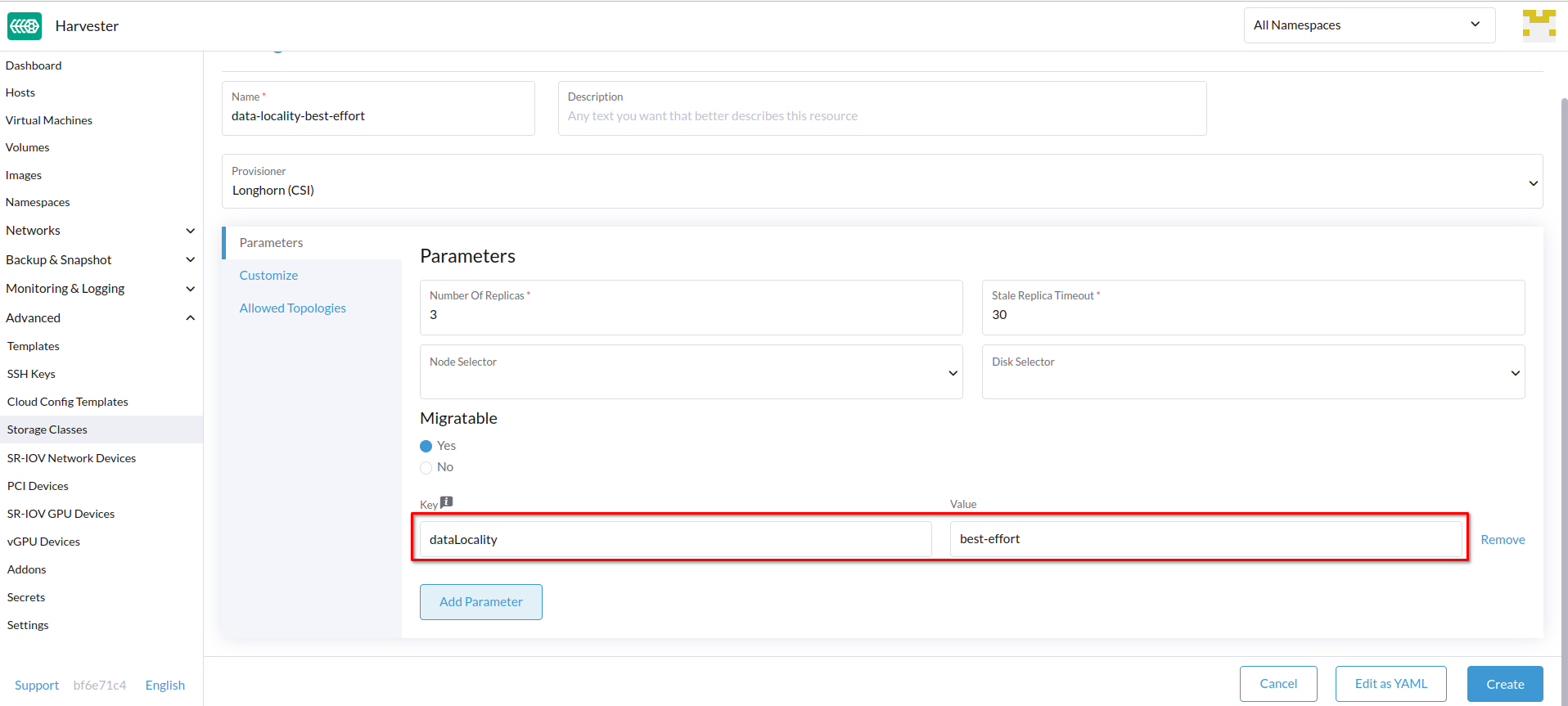
資料在地性選項
Harvester 目前支援以下選項:
-
disabled: 套用此選項時,Longhorn 可能會也可能不會將複本排程在與使用該卷冊的 Pod 相同的節點上。這是預設選項。 -
best-effort: 套用此選項時,Longhorn 總是嘗試將複本排程在與使用該卷冊的 Pod 相同的節點上。即使因為環境限制(例如磁碟空間不足或磁碟標籤不相容)導致本地複本不可用,Longhorn 也不會停止該卷冊。
Longhorn 提供了第三個選項 strict-local,它強制 Longhorn 僅在與使用該卷冊的 Pod 相同的節點上保留一個複本。Harvester 不支援此選項,因為它可能會影響某些操作,例如 VM 線上移轉。
如需更多資訊,請參閱 Longhorn 文件中的 Data Locality。
Containerized Data Importer (CDI) 設定
Harvester 與 Containerized Data Importer (CDI) 整合,以處理以下 StorageClass 的 VM 映像檔管理:
- Longhorn V2 資料引擎
- LVM
- 第三方儲存 (Third-party storage)
您可以使用 Harvester UI 或 CDI 註解 (annotations) 來覆寫 StorageClass CDI 屬性的預設設定。
Harvester UI 目前不支援在第三方儲存中使用 CDI。請改為將 Harvester CDI 註解直接套用到第三方 StorageClass。
為了啟用對 Day-2 操作的 CDI 設定編輯,Harvester 提供了 StorageClass 屬性來自動更新底層 CDI 設定。
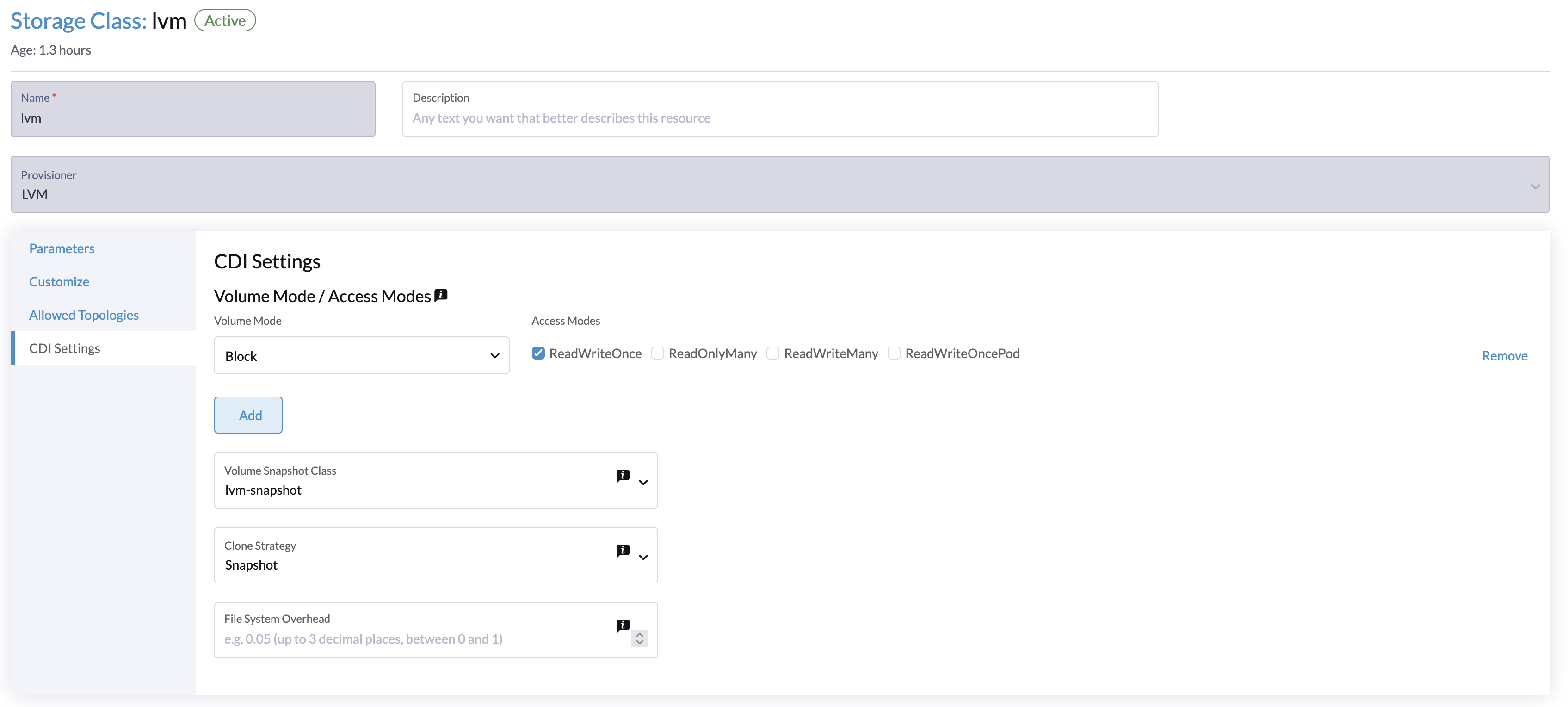
CDI Settings 畫面上的每個欄位都對應到 StorageClass 中的一個註解。
| UI 欄位 | 註解 (Annotation) | 描述 | 支援的值 | 範例 |
|---|---|---|---|---|
| Volume Mode / Access Modes | cdi.harvesterhci.io/storageProfileVolumeModeAccessModes | 預設 PVC 卷冊模式和存取模式 | 包含卷冊模式和存取模式的 JSON 物件 | '{"Block":["ReadWriteOnce"]}' |
| Volume Snapshot Class | cdi.harvesterhci.io/storageProfileVolumeSnapshotClass | 對使用此 StorageClass 的虛擬機器映像檔進行快照時,所使用的 VolumeSnapshotClass 名稱。此設定僅在您使用 snapshot 複製策略時適用。如果您已在相應供應程式的 csi-driver-config 設定中配置了 volumeSnapshotClassName,則將使用該值作為預設值。 | 有效的 VolumeSnapshotClass 名稱 | lvm-snapshot, longhorn-snapshot |
| Clone Strategy | cdi.harvesterhci.io/storageProfileCloneStrategy | 用於使用此 StorageClass 的 VM 映像檔建立卷冊的複製策略。 | copy: 透過網路複製資料區塊snapshot: 透過建立暫時的 VolumeSnapshot 並將其還原到新 PVC 來複製卷冊csi-clone: 使用 CSI 複製操作來複製卷冊 | snapshot |
| File System Overhead | cdi.harvesterhci.io/filesystemOverhead | 計算 PVC 大小時要考慮的檔案系統額外負荷 (overhead) 百分比。 | 0 到 1 之間的十進制數值,最多 3 位小數 | 0.05 |
以下是 StorageClass YAML 設定的範例:
apiVersion: storage.k8s.io/v1
kind: StorageClass
metadata:
  name: lvm
  annotations:
    cdi.harvesterhci.io/storageProfileCloneStrategy: snapshot
    cdi.harvesterhci.io/storageProfileVolumeModeAccessModes: '{"Block":["ReadWriteOnce"]}'
    cdi.harvesterhci.io/storageProfileVolumeSnapshotClass: lvm-snapshot
    cdi.harvesterhci.io/filesystemOverhead: '0.05'
請避免直接變更儲存設定檔 (storage profile) 或 CDI。相反地,應透過使用 CDI 註解,讓 Harvester 控制器同步並持久化儲存設定檔的配置。
以下是支援的 StorageClass 的預設值:
-
Longhorn V2 資料引擎
cdi.harvesterhci.io/storageProfileCloneStrategy:"copy"cdi.harvesterhci.io/storageProfileVolumeSnapshotClass:"longhorn-snapshot"
-
LVM
cdi.harvesterhci.io/storageProfileVolumeModeAccessModes:'{"Block":["ReadWriteOnce"]}'cdi.harvesterhci.io/storageProfileCloneStrategy:"snapshot"cdi.harvesterhci.io/storageProfileVolumeSnapshotClass:"lvm-snapshot"
-
第三方儲存:請參閱 CDI 儲存庫中的
storagecapabilities.go。如果供應程式未列在其中,您必須指定cdi.harvesterhci.io/storageProfileVolumeModeAccessModes註解。
使用案例 (Use Cases)
HDD 情境
隨著 StorageClass 的引入,使用者現在可以使用 HDD 進行分層 (tiered) 或封存冷儲存 (archived cold storage)。
不建議將 HDD 用於 Guest RKE2 叢集或具有良好效能磁碟需求的 VM。
建議做法
首先,在 Host 頁面新增您的 HDD,並根據需要指定磁碟標籤,例如 HDD 或 ColdStorage。關於如何新增額外磁碟和磁碟標籤的詳細資訊,請參閱 多磁碟管理。
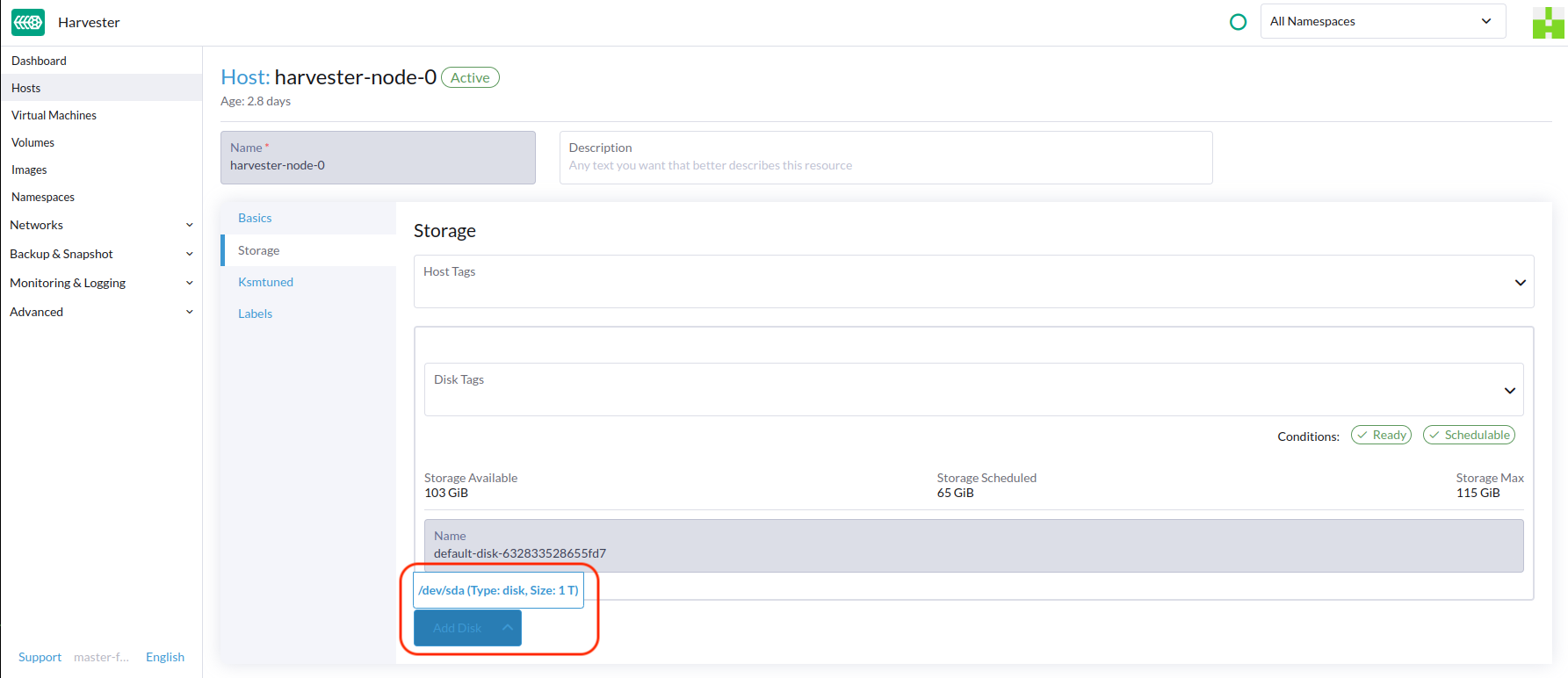
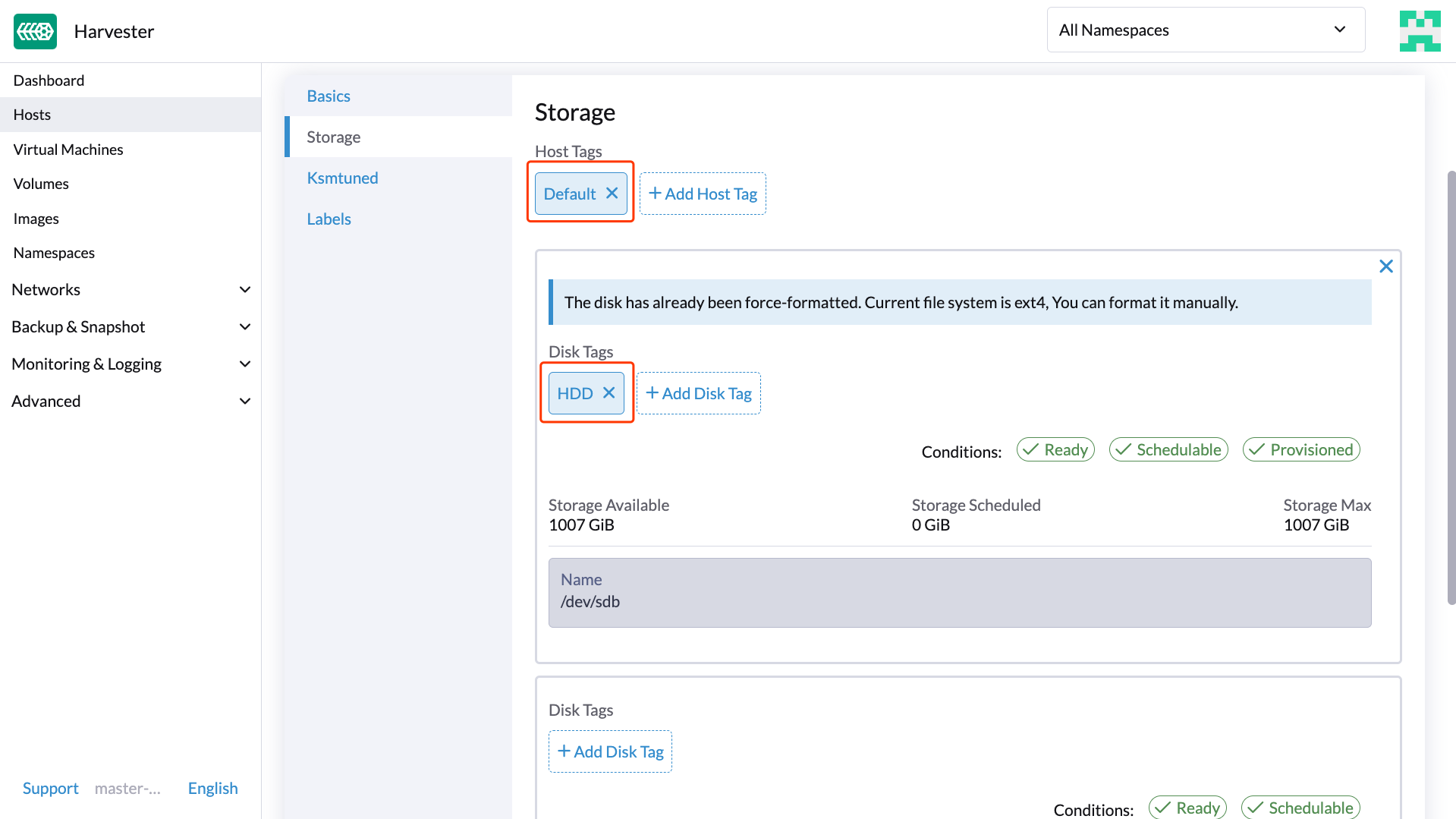
接著,為 HDD 建立一個新的 StorageClass(使用上述磁碟標籤)。對於容量大但效能較慢的硬碟,可以減少複本數量以提升效能。
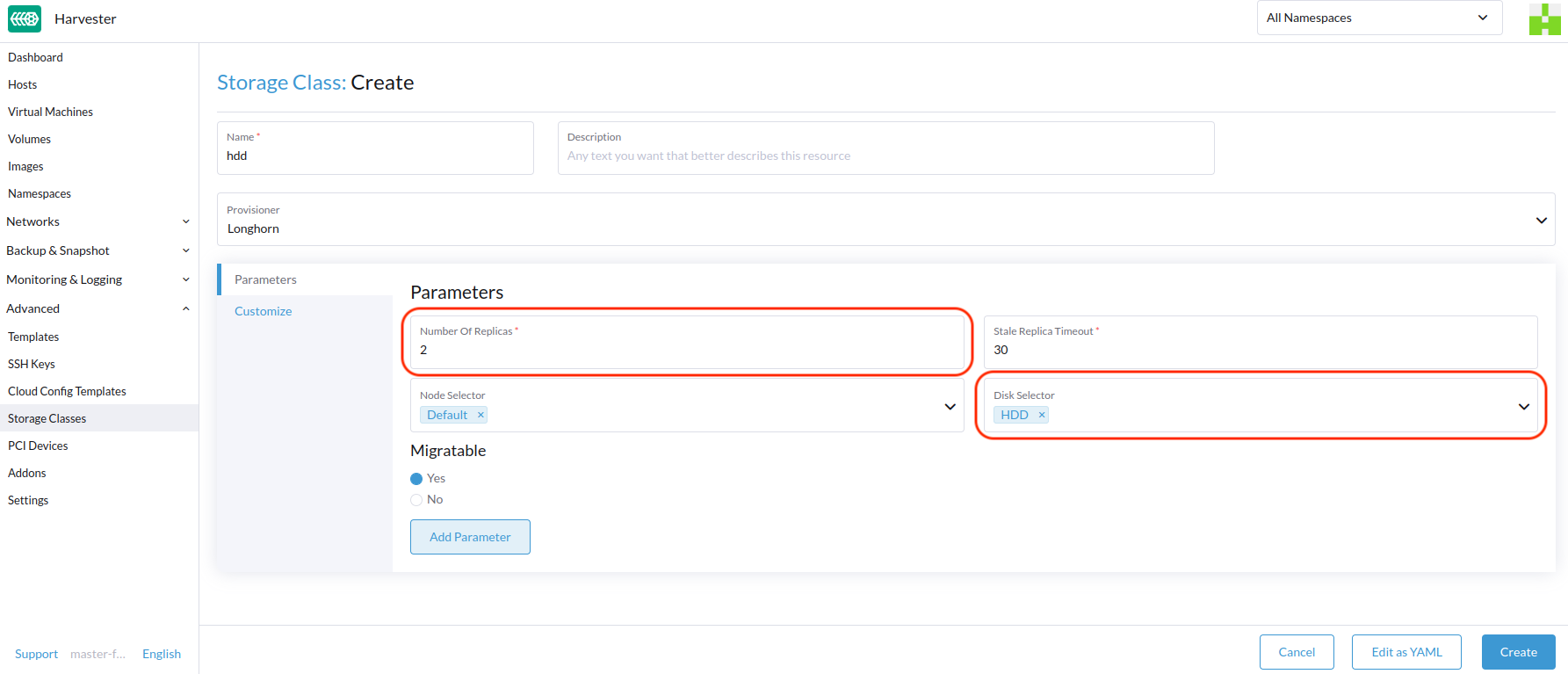
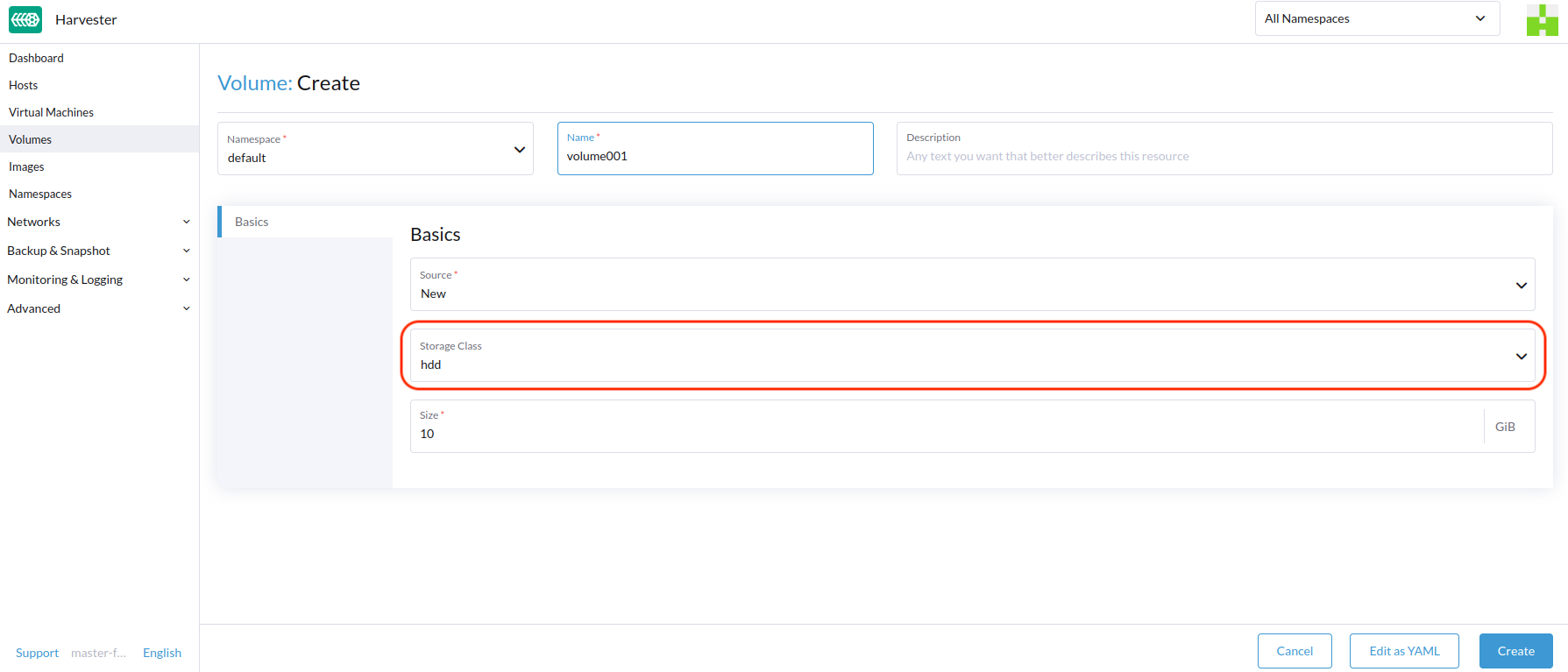
您現在可以使用上述 StorageClass 建立卷冊,利用 HDD 主要進行冷儲存或封存用途。